RISE EZProxy parser step by step

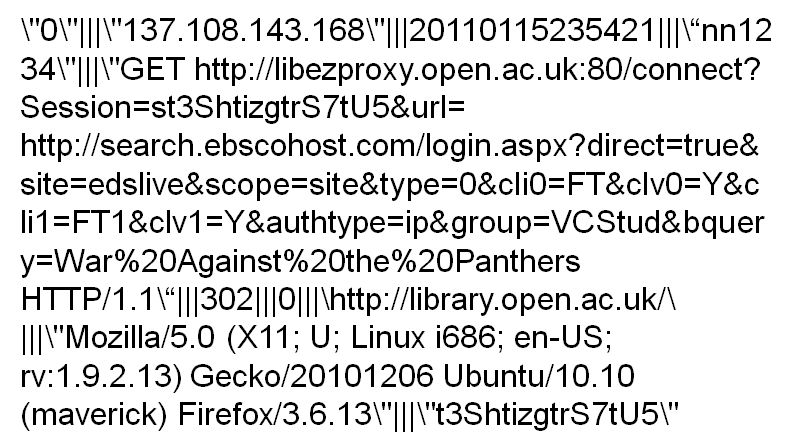
We thought that it might be useful to set out step by step how we get from an EZProxy logfile entry to a set of bibliographic data that we can use in the display of our recommendations.  As a minimum when you make a recommendation users will want to see the article title so they can judge whether it is relevant.  The parser we use to process the daily EZProxy logfiles carries out the following steps:

  1. Extract the Ebsco accession number from the EZProxy url
    We are able to do this because we push access to our Ebsco Discovery Solution (EDS) through EZProxy.  Consequently most of the records in the EZProxy logfile will be Ebsco urls.
  2. Use the Ebsco accession number as a key to obtain bibliographic data from the EDS API.  
    We query the Ebsco API with the Ebsco accession number and look for a DOI, ISSN, Volume number, Issue number and start page.  We aren’t allowed to store this in the RISE database so we then have to obtain some article level metadata from a source that allows us to store bibliographic data within the RISE database.
  3. Use the Ebsco data, ideally the DOI but if there is no DOI then use the ISSN, Volume number, Issue number and start page to query Crossref. 
    At this stage we are trying to obtain a match for an article from the Crossref database so we can retrieve some bibliographic metadata that we can store in the RISE database.  Ideally we want to match against the DOI but if we can’t then we look for other combinations of data. 
  4. From Crossref retrieve the article title, journal title, ISSN, volume and issue details and start page.
    Once we have some relevant bibliographic data then we store them in the RISE database along with the DOI, if present.

Why are we using Crossref for the bibliographic data?
Crossref’s terms and conditions allow libraries to store the data locally,  ‘the Library may cache the DOIs and metadata and incorporate DOIs and metadata into their content and library systems’ http://www.crossref.org/03libraries/33library_agreement.html  Unfortunately our understanding of Crossref’s terms are that they would prevent the data that is derived from Crossref being openly released. 

What other approaches could be adopted?
It may well be possible to adopt other approaches.  Two spring to mind.  EDINA have recently openly released a set of OpenURL data and it would be interesting to try to match RISE content against that dataset.  Another alternative would be to use the Mendeley API to do a similar exercise.  It would be interesting to see which might give the best result.  In both cases the bibliographic data is openly available so would mean that a RISE dataset could be released that could include some bibliographic data

Posted in Technical and Standards | Tagged , , , , , | 1 Comment

June update

Activities during June and early July
A bit later than expected owing to a week spent largely talking to people about RISE, Activity Data and Shared Services.

June and early July has been spent mainly in finishing off the evaluation sessions and in planning for and delivering the RISE Innovations in Activity Data event  We are in the process of writing up the evaluations and they will form part of the Users post for the Project. 

Innovations in Activity Data for Academic Libraries was conceived as a small event that would give a chance for librarians to hear about the library-related projects in the programme strand and to think about how they might be able to use activity data themselves.  In the end we had people from six other Universities (not including those at institutions running other Activity Data projects).   It was quite a lot of effort to get everything together for even a small event but everything went well on the day, even the online presentation and we coped with the various challenges thrown at us.  Thanks to everyone who attended, presented or helped with the day.

Activity Data programme meeting
Last week the RISE project also went to the Activity Data programme meeting, again in Milton Keynes on 5 July.  The RISE presentation for this event is available here on Slideshare. 

The programme meeting included both the Activity Data and Business Intelligence projects and it was particularly interesting to see the BI projects and their different focus.  Seeing some of the work those projects have just started with dashboards, visualisations and work around looking at measuring student success (or lack of success) was really valuable for us to see. The Activity Data programme manager Andy McGregor has blogged about the programme meeting here.

Posted in Benefits, Update, Wins and fails (lessons along the way) | Leave a comment

Presentations and comments on the Innovations in Activity Data in Academic Libraries event

Innovations in Activity Data
RISE event photoMonday 4th July saw the RISE team running a small activity data event on campus at the OU. Aimed specifically at academic libraries, the event, attended by around 25 people was the opportunity for people to hear some of the latest work from the JISC Activity Data programme with presentations from three of the library-related projects and an overview of both the programme and day from the Activity Data Synthesis project.  It was also a chance to think about some of the potenial and challenges of activity data in a world cafe-type event, and to have their horizons expanded by hearing about data visualisation tools and techniques.

Presentations
A few of the presentations are available online and we will link to them from here

What are the challenges around activity data in libraries?
World Café style workshop exercise
As part of the workshop we ran a world-cafe style exercise to get delegates to think about some of the practical aspects of activity.  We covered three aspects:

  • What data?, How much?, Where is it?, How do you get at it?
  • What to do with it?
  • What are the challenges?

If you aren’t familar with this style of activity it’s an informal exercise where participants write their thoughts onto a tablecloth.  The idea is that there is a topic under discussion at eaRISE event world cafe tableclothch table and people walk around from table to table talking to people at the table and writing their thoughts about the issue onto the tablecloth.  Hopefully the comments written on the tablecloth encourage people to add their own thoughts that might confirm or dispute the comments made.  To help move things along we used facilitators at each table to encourage people to write their thoughts down. 

Over the next few days we will be writing up the comments and make them available through this blog.

Comments
If you were at the event and want to comment or blog about it we are happy to link to your thoughts from here.  First off the mark is Paul Stainthorp from Lincoln here.  Thanks from the RISE team to everyone who presented, helped out or came along on the day.  We hoped you had a great time.

Posted in Innovations in Activity Data | Tagged , , , , , , , | Leave a comment

RISE Presentation from Innovations in Activity Data for Academic Libraries event

The RISE presentation from the Innovations in Activity Data for Academic Libraries event at the Open University in Milton Keynes on Monday 4th July 2011 is now up on Slideshare here

or can be downloaded from this blog RISE presentation for workshop 2011-07-04

Posted in Innovations in Activity Data | Tagged , , | 1 Comment

Innovations in Activity Data workshop 4 July 2011 The Open University, Milton Keynes

Innovations in Activity Data workshop

Outline
A one-day workshop aimed at Higher Education library services who are interested in practical applications of activity data, what can be collected, how it can be used, visualised and presented.  The workshop will be an opportunity to hear from library projects working on the JISC Activity Data programme and from practitioners working in this area.

Location
Christodoulou meeting rooms, The Open University, Walton Hall, Milton Keynes

Date
4 July 2011

Cost
Free to attend.  Refreshments will be provided.

Programme

9.45am                 Registration

10.15am               Welcome and Introduction
Nicky Whitsed, Director of Library Services, The Open University

What activity data can you use?  Examples from JISC Activity Data programme

10.30am SALT project ‘Surfacing the Academic Long Tail ‘– MIMAS Joy Palmer, Janine Rigby

11.10am             Coffee break

11:30am RISE project ‘Recommendations Improve the Search Experience’ – Open University, Richard Nurse

12.10am               LIDP project ‘Library Impact Data Project’ – University of Huddersfield, David Pattern (via video)

12.50pm               Lunch break

How can you use the data?

1.50pm                 What are the challenges around activity data in libraries?

World Café style workshop exercise

- What data?, How much?, Where is it?, How do you get at it?
- What to do with it?
- What are the challenges?

2.40pm                 How can you visualize activity data? Tony Hirst, Lecturer, Department of Communication and Systems, Open University

3.10pm                 Tea break

3.30pm                 Wrap-up session – JISC Activity Data Synthesis project, David Kay, Sero Consulting

4.00pm                 Close

Who should attend? Librarians, leaders and managers, practitioners, developers and advocates from academic libraries,  who want to understand the potential of activity data to shape, guide and improve services, to inform users and to deliver innovative new services.

Register by email to: RISE-Project@open.ac.uk

Posted in Innovations in Activity Data | Tagged , | 2 Comments

Presentation from JISC Activity Data Online event 2 June 2011

Posted in Uncategorized | Tagged , | Leave a comment

May update

After the flurry of technical activity earlier in the project May has been a quieter month that we’ve spent mainly arranging the evaluation work that starts in June, and looking at some of the early feedback from the on-going user survey.  

User evaluation work
Any research with students at the OU has to be approved by an ‘ethics’ committee, the Student Research Project Panel.  So we complete a fairly lengthly template that outlines the research we plan to do, who we will involve, how we will go about the research and what Data Protection processes we have in place.  That goes off to the panel for assessment and all being well you get approval for your evaluation activity. 

At the OU, apart from dealing with the ethical basis of the research the process also acts to regularise the contacts with students so they aren’t deluged with requests and emails.  As a distance learning institution a lot of contact with students is by email so it’s important that students can control the amount of material that is sent to them as the pace of study can be intensive.  So students can opt-in to being available for research of this type. 

Once the project is approved then we get sent a list of contact details for the students we are allowed to contact to take part in the evaluation.  For RISE we’ve had quite a good response and have been able to arrange the first few one to one interviews starting tomorrow.  We’ve also had people saying that they are interested in checking out MyRecommendations online and will complete the feedback. 

Feedback so far
When we setup the RISE interface we added a feedback link to a survey using SurveyMonkey  This has allowed us to collected some user responses more immediately. 

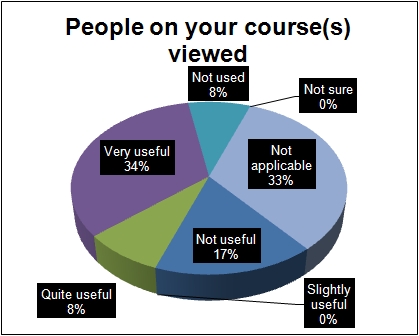
RISE feedback People on your course viewed

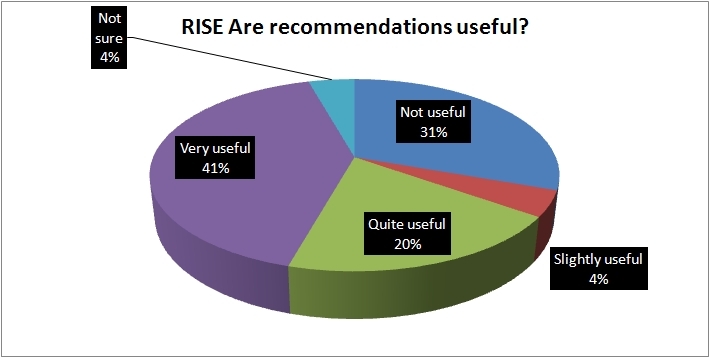
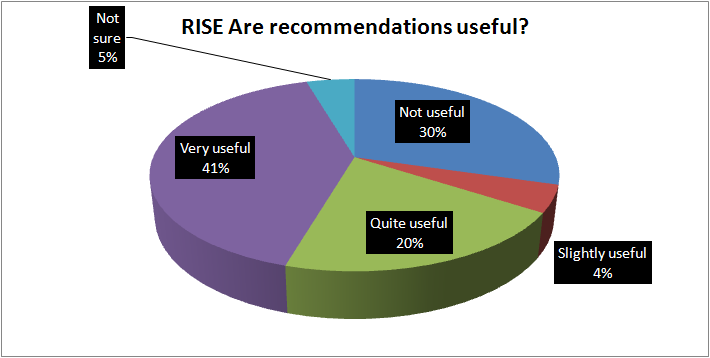
So we’ve asked questions about each of the different types of recommendations that we are providing to get people to tell us how useful they are. 

For course recommendations i.e. ‘People on your course viewed’   more than 40% saw them as Very or Quite useful.  It should be noted that if you aren’t on a course you don’t get any course recommendations so that should account for the 33% who said ‘Not applicable’.  Course recommendations are based largely on the EZProxy logfiles so have the largest amount of data to draw on. 

RISE feedback These resources may be related to others you've viewed 

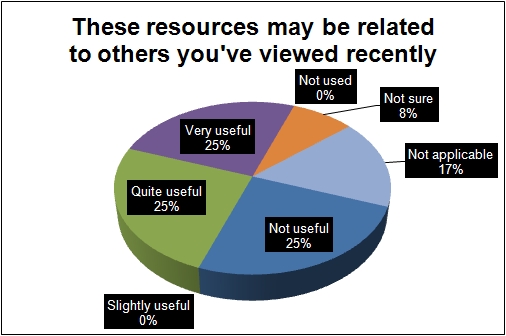
The second type of recommendation, which tries to relate articles you’ve viewed with similar articles by postulating that there is a relationship between articles that a user views sequentually, shows that 50% thought them to be Very or Quite Useful, but with a larger number seeing them as not useful.  There does seem to be a ‘marmite’ effect where recommendations are either relevant or not.  That could be down to the quantity of recommendations data as RISE currently relies on data collected since the interface went live. 

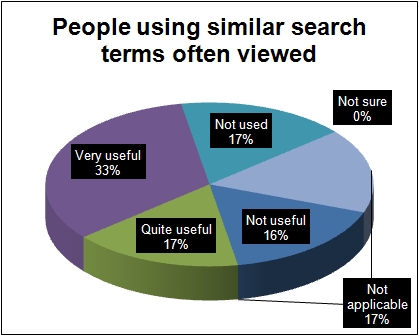
RISE feedback People using similar search terms often viewedThe third type of recommendation relates to the search terms that are used and the articles viewed.  Agian 50% saw these are Very or Quite useful, but a smaller percentage saw them as Not useful.  Again these recommendations are being powered by search terms entered into the RISE interface as we don’t have the search terms used for the EZProxy data. 

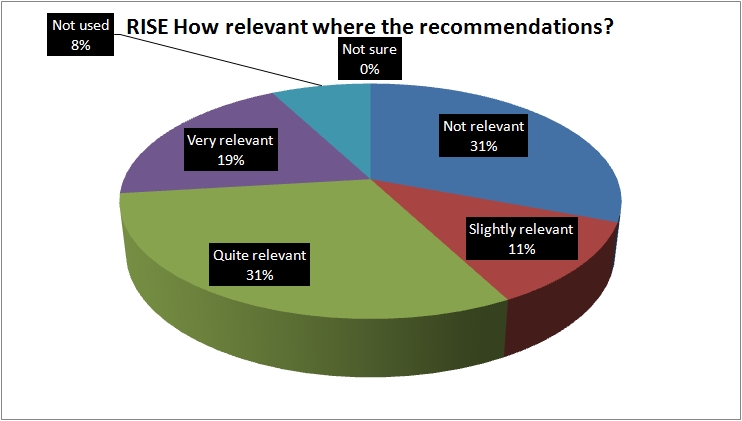
RISE feedback How relevant were the recommendations 


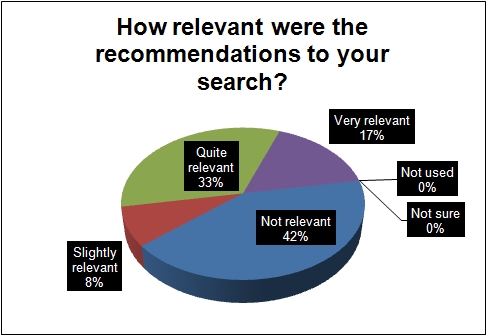
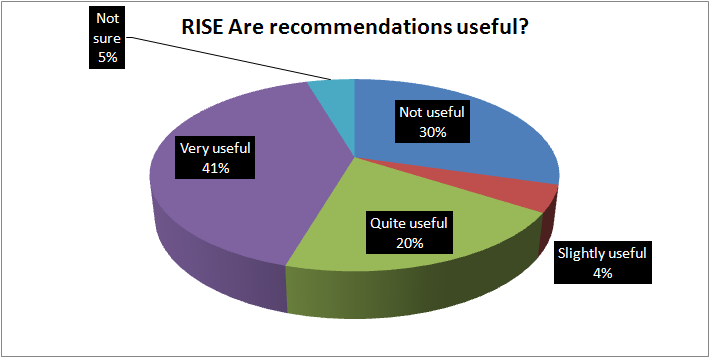
The final question we asked was to try to understand a bit more about the relevance and quality of the results.   Here there was a much more definite Not Relevant response at 42% but 50% saw the results are Very or Quite relevant. So again a bit of a ‘marmite’ response that bears more detailed investigation to undestand why.

EDINA OpenURL data openly released
A few days ago came the great news that EDINA have released their OpenURL data http://openurl.ac.uk/doc/data/data.html  So we’ve been having a look at the data to see how it could help us with RISE recommendations.  The size of the dataset at nearly 300,000 rows is larger than we have with RISE and although there aren’t any search terms included we think there are ways that we can use it with RISE so have scheduled some time to setup a RISE parser to ingest the data and test it later this month.  A great example to us all though and it will be interesting to see what can be done with the data.

Posted in Update, Users | Tagged , | Leave a comment

Technical Approaches

There are numerous technical challenges and milestones relating to the RISE project, this post will aim to address some of the most important aspects.

Database Structure

The database’s design is probably the most important aspect of the RISE Project’s development, being a heavily used source of data in the system it has to be capable of generating the recommendation types required as quickly and efficiently as possible.

The data in this database initially came from an archive of access logs generated by EZProxy, yet along with these log files it also has to accommodate data generated by the MyRecommendations web service going forward, as such the database’s schema, which can be found on the Technical Resources page is designed such that it is able to accept and use data from all of these sources effectively.

Throughout development it has also been imperative to bear in mind that some of the data contained within this database is to be released publicly and as such must be useful to external entities while also being fully functional internally. One of the main concerns regarding this ensuring anonymity, which is described in further detail on the Technical Resources page.

Parsing Data

As mentioned in the previous section the system has to be designed such that it can accept data from gzipped EZProxy log files. This is done via a PHP parser which extracts the relevant useful information. Some of this information is then used for further information gathering via the EBSCO Discovery Solution API, which stores full information on the resources available to the OU.

The data received by the parser is in the following format:

<REMOTE_HOST>|||<DATE_TIME>|||<USER_ID>|||<HTTP_REQUEST>
|||<HTTP_REFERER>|||<HTTP_RESPONSE>|||<RESPONSE_SIZE>
|||<SESSION_ID>

With the exception of the response size variable, all of the above are used by the database in the process of generating recommendations, more specific uses for each are outlined later in this post.

Notably at this stage there is no variable which contains information relating to a particular resource, hence the most salient variable becomes HTTP_REQUEST, from which we extract the requested URL’s ‘AN’ parameter. This ‘AN’ parameter, if present contains an Accession Number, which is a resource identifier used by EDS (EBSCO Discovery Solution – used to index resources). Using this AN (an 8-digit integer), the parser then requests further resource details from the EDS API.

The EDS API returns resource data in an XML format, an example of which can be found here.

From this XML result the parser extracts the required resource information, such as Name, ISSN/DOI, Author(s) and Publication Dates.  This data is then used to search for matching metadata from the Crossref service.

This crossref data, combined with the data retrieved from the information from the log file entries is then formatted appropriately, and inserted into the RISE database.

A flowchart depicting the logic behind this parser can be found on the Technical Resources page.

Authentication

Part of this project is to develop and release a Google Gadget, which is to provide similar functionality to that offered by the MyRecommendations interface in a lighter and more portable interface.

It is important to note that The Open University’s online e-resource collections are only to be accessed by current staff and students, as such any online service with the aim of indexing said resources must perform it’s own suitable authentication & authorization of users. On pages hosted on Open University Servers this is accomplished using SAMS, which is a proprietary server-side authentication system.

The initial plan for the Google Gadget was to authenticate using a token-based method similar to the following:

  1. Pass the user to a page hosted on OU Servers, which is protected by SAMS.
  2. SAMS-Protected page generates a hash token, and redirects the user to a gadget authentication page with the token as a URL parameter, and stores this token in the database.
  3. The gadget authentication page senses this URL parameter, and sets a cookie on the user’s machine which is accessible by the gadget itself.
  4. When a user accesses the gadget, the token stored in the cookie is checked against the database entry stored in step 2.

Fortunately, the RISE Project was able to take advantage of hosting the gadgets directly on Open University servers, and as such can utilize a much more efficient & secure authentication approach:

  1. If user isn’t authenticated with SAMS, the gadget page displays a link (to open in a new window) to a SAMS-protected page.
  2. In order to view this page, a user must be successfully authenticated, as such this page, when viewed instructs the user to close the external window, and return to the gadget.
  3. The gadget will now be able to successfully access the user’s credentials (as a successful SAMS authentication has taken place) and perform searches and provide recommendations.

Tracking & Analytics

As the MyRecommendations and Google Gadget aspects of the RISE Project utilize AJAX & Javascript technologies within their UIs and in the processes of displaying search results and recommendations it becomes necessary to implement advanced tracking measures which aren’t included by default with analytics implementations.

The main package in use for the RISE Project is Google Analytics.

As an example, if a user lands on the MyRecommendations interface their initial pageview is tracked. Their searches however use AJAX to Asynchronously fetch the results without having to reload the static parts of the interface. As this means the actual page isn’t being reloaded (the Google Analytics JavaScript isn’t being requested again by the user), it’s necessary to manually “push” a pageview to the Google Analytics servers with information about the current action.

In the above example, we would push a pageview event with the parameters “/search/<search terms>”. Which then allows users of the Google Analytics interface not only to see the number of actual searches, but also to drill-down and see which pages have been requested within the /search/ section (i.e. most commonly used search terms).

This approach is also used to track searches on the Google Gadget interface.

Providing Recommendations

The recommendation types outlined in previous posts are generated based on the logged-in user’s credentials, and resources which may have relationships with said credentials.

Relationships are stored in tables within the database, an example of a relationship stored within one of these tables is as follows:

Field Name: Value:
course_id 32
resource_id 54645
value 14

This example depicts a relationship between resource 54645 and course 32, having a value of 14. This means people on course 32 have given resource 54645 a value of 14. Values are assigned based on resource views and subsequent relevancy ratings (if available).

For example, a user following such a recommendation would increment the above relationship to 15 by simply following the link, indicating at least the resource title was somewhat interesting to the user.

If this user then chooses to rate, the following rating choices would result in the respective ‘Value’ after rating.

Rating Choice Resulting Relationship Value Change Logic, after +1 for resource visit
Very Useful 16 +1
Somewhat Useful 15 0
Not Useful 13 -2

From the table above, it is evident that the logic is weighted in favour of the resource being relevant (i.e. the value will always go UP by at least 1, unless ‘not useful’ is selected), this is based on the theory above that the resource link appearing useful enough to follow gives some indication that the resource is more likely to be relevant than irrelevant. Giving the ‘Not Useful’ rating a weight of -2 means the least useful resources can still ‘sink’ and appear less frequently. This approach also ensures the actions of those users choosing not to provide feedback can still be utilized by the recommendations engine.

It is also important to note that the ratings are purely for the actual relevance to a particular user, and not on the quality of the resource itself. This ability to rate both relevance and quality may be implemented in the future.

There is a relationship table for each of the three recommendation types, all are controlled and manipulated by actions of users in the RISE system, and the access logs generated by other library systems.

Posted in Google Analytics, Recommendations, Technical and Standards | Tagged , | Leave a comment

Search focus groups

In parallel with the RISE project OU Library Services have been running an evaluation of the One-Stop search system now it has been in place for a few months.  So we’ve had a survey running and Duncan from our Learning and Teaching team has now run a couple of focus groups, one with undergraduates and the other with postgraduates.  As part of the focus group activities RISE asked the focus group team to raise the subject of whether they would find recommendations to be useful as one way of testing the project hypothesis.

One of the suspicions that we had was that there might well be different attitudes to recommendations based on the level they were studying at.  The team running the focus groups have now written them up and we have some initial feedback about what students had to say about the value of recommendations.   Thanks to the One-Stop evaluation team and particularly to Duncan for covering recommendations in the focus groups.

Undergraduates
The focus group comprised six undergraduate students, three studying level 1 courses, 3 at level 2.  Two had previously studied several modules up to level 3.  The students were studying a range of subjects.  The group were asked if they would make use of recommendations.  

There was a general consensus that ratings and reviews from other students would be beneficial (because ‘other people’s experiences are valuable’) especially if it was known which module the student leaving the rating had done, and how high a mark they had got for their module.

Postgraduates
This focus group was made up of five postgraduate students (one of which was also a member of staff) studying a range of different subjects through arts, science, social sciences and educational technology.  The main feedback was that:

  • Students use citation information as a form of recommendation
  • Students are wary of recommendations when they don’t know the recommender e.g. tutor recommendations are valued
  • It was felt that recommendations specific to a module should be fed through to that module’s website e.g. for good databases
  • Students would appreciate recommendations of synonyms when searching our collections e.g. stress/anxiety
  • Resources from the institutional repository are trusted as authors can be contacted (this comment from a student who is also a member of staff)

Reflections on the comments in the focus groups
Knowing the provenance of a recommendation is clearly important and that seems to be a clear difference between academic recommendations and an ‘amazon-type’ purchasing recommendation.  There is a critical element of trust that is needed.  You could characterise it as ‘I don’t know whether to trust this information until I know more about who or where it comes from’  That implies a good level of academic caution about the quality of resource recommendations.  So that is possibly a qualification to our hypothesis

“That recommender systems can enhance the student experience in new generation e-resource discovery services”

‘Qual 1 … as long as it is clear where the recommendations come from and users have trust in their quality’

Another reflection is that there is a slightly different focus between undergraduates and postgraduates.  Undergraduates see quality as being represented by the success of students studying their modules, postgraduates see quality as being represented by recommendations being made by people they trust.

Pushing recommendations into module websites is an interesting idea.  There has been some discussion about methods of pushing tutor recommendations to students so this sounds like an area for further work at some stage.  The idea of a synonym tool that could provide suggestions of related terms that could help with searching is also quite a good idea.

Next steps
RISE will be running some invidual sessions with users over the next month or so to test out the tools that have been built and to do some more detailed work to help to understand the circumstances where recommendations about e-resources are of use and what type of recommendations are best.   Invitations are currently going out to a pool of students.

Posted in Hypothesis, Recommendations, Users | Tagged , , , , , , | 2 Comments

Google Gadget and Search Interfaces page

The RISE prototype Google Gadget is now available for use. RISE Google Gadget screenshot This is a Google Gadget version of the main RISE interface that allows you to search our One-Stop e-resources service and see recommendations provided by RISE.

It can be downloaded from the Google Gadgets directory here, or added by manually adding this link into the Add Stuff > Add feed or Gadget feature on your iGoogle desktop. 

The first time you use the Gadget it will ask you to sign in to the Open University using your computer login (external users can create a computer login and will be able to see search results and recommendations but won’t be able to connect to licensed resources).

Further details of how to find and use the Gadget are included on our new Search Interfaces page.  This page provides details of both the main RISE search interface at http://library.open.ac.uk/rise and the Google Gadget.

Posted in Update | Tagged , , | Leave a comment